Connect Wallet
Let’s go ahead and connect to our Nami wallet.
First, we need to create our interface which is just going to be a button to connect to the wallet for now.
Click here to get the CSS file (style.css) in the GitHub account
<!DOCTYPE html>
<html lang="en">
<head>
    <meta charset="UTF-8">
    <meta name="viewport" content="width=device-width, initial-scale=1.0">
    <title>Document</title>

    <link rel="stylesheet" href="Style.css">

</head>
<body>
    <div class="head">
    <img src="coxygen.png" id="connect">
    <h1>Connect to a Nami wallet using Lucid</h1>
</div>
    <div class="form2">
        <p id="pconnect">Written by: Banele Nhlapo</p>
        <h1 id="status">
            Status: Not Connected
        </h1>

        <button>
            Connect Wallet
        </button>

    </div>
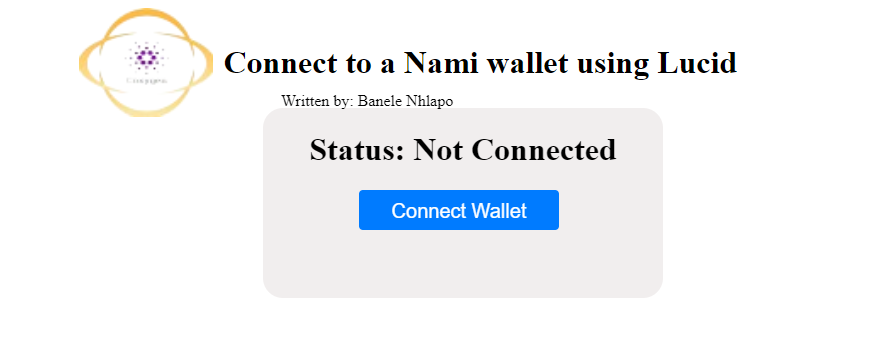
Next, we need to import Lucid from the web.
<script type="module">
     import { Lucid,Blockfrost,fromText} from "https://unpkg.com/lucid-cardano/web/mod.js"
Next, let's write the code to connect to the wallet.
 const status = document.getElementById('status');
        const button = document.getElementById('button');

        let lucid;

        async function connectWallet() {
            if (typeof window.cardano == 'undefined' || typeof window.cardano.nami == 'undefined') {
                return;
            }

            try {
                const api = await window.cardano.nami.enable();
                lucid = await Lucid.new();
                lucid.selectWallet(api);
Now that we have the code for that. We want to display the total amount of Utxos that are in the wallet.
This line of code gets the Utxos in the wallet:
const balanceHex = await lucid.wallet.getUtxos();//get the wallet balance
Now we want to add up all the Utxos, and display the total amount in the button, and update the status. If there are no Utxos we want to display an error saying that there are no Utxos found.
  if (balanceHex.length > 0) {
                    const firstUtxo = balanceHex[1];

                    // Sum up the lovelace amounts of all UTXOs
                    const totalBalanceLovelace = balanceHex.reduce((sum, utxo) => sum + BigInt(utxo.assets.lovelace), BigInt(0));
                        const lovelacePerAda = BigInt(1_000_000);
                        const balanceADA = totalBalanceLovelace / lovelacePerAda;// covert lovelace to ada

                        status.innerHTML = "Status: Connected"// update status to connected
                        button.innerHTML = `Balance:${balanceADA} ADA`;// show balance in the connect button
                        sendButton.disabled = false; // Enable the send button after connecting

                } else {

                    status.innerHTML = "Error: No Utxo found in the balance information.";
                }
                } catch (error) {
                console.error("Error connecting to wallet:", error);
                const status = document.getElementById('status');
                status.innerHTML = "Error connecting to wallet.";
            }
        }
Notice that we wrapped the code around try-catch statements, we want to catch the errors that might occur.
Let's call our function when the button is clicked.
 button.onclick = connectWallet;//button to connect the wallet

  </script>
</body>
</html>
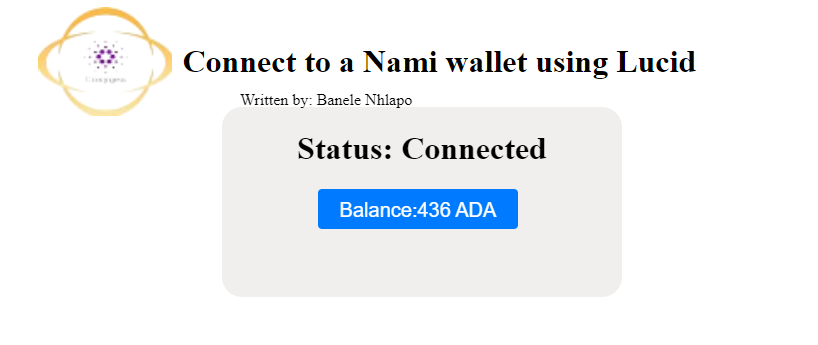
Thats how you connect to a Nami wallet.
source code
Written by: Banele Nhlapo
email address: nhlapob78@gmail.com